
BookPeek
Hand Your Book Research to Your Own AI
BookPeek is a free Amazon book niche research extension for Chrome, and it has an MCP. Ask your AI app whether a niche is worth writing for and it reads Amazon in your own browser to answer — or read it yourself in the panel. No account, no server of ours, and no invented search-volume number.
No account · Read in your browser · Sales always shown as ranges
What Book Niche Research Actually Is
Amazon is where people go looking for a book. They type what they want, like watercolor for beginners or bearded dragon care, and Amazon shows the books it thinks answer best. Book niche research is choosing which of those searches to write a book for.
Picking a subject you like is the easy part. The hard part is knowing whether there is room. If page 1 is full of books from publishers with thousands of ratings, a new book sinks. If it is self-published books that are a few years old with thin page counts and complaints in the reviews, there is a gap. That difference decides whether a month of writing pays.
BookPeek answers that on Amazon itself — and then hands the whole thing to your AI app, so the evening of research every KDP guide tells you to do takes about a minute.
Why This One
Most KDP tools show an author nothing until they make an account. The rest stamp numbers over Amazon's results and sell a search-volume figure that nobody actually measures.
BookPeek works the moment it is installed, with no account and no server of ours. It reads the two things those tools do not touch: what the winning books' readers complain about, in their own words, and what is inside the first pages of the books you are up against. And it hands the whole niche to your own AI through an MCP.
Every figure it prints comes with what it was read from, and it tells you how many books it managed to read. If it cannot answer, it says so — which, in a category where the biggest tool has 50,000 users and 2.4 stars for quietly breaking, is the whole product.
See BookPeek in Action
A one-minute demo, then real screenshots from an Amazon search for watercolor for beginners. Click any screenshot to open it full size.
Everything BookPeek Does
No trial, no locked tabs, no deep-dive credits. Everything below is in the extension.
An MCP for your own AI app
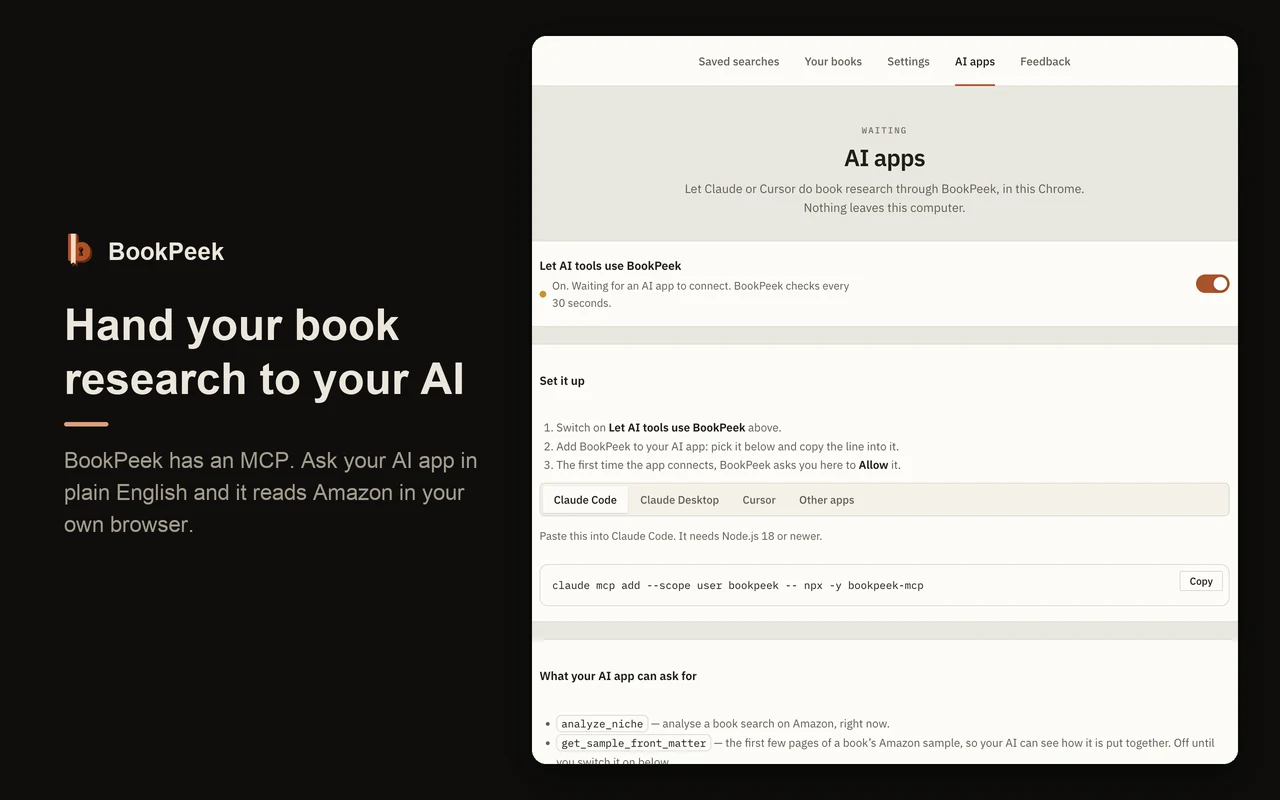
AI apps that support MCP can ask BookPeek to do the research, in your own browser, on your own Amazon. Eleven tools, no quota, no account. This is the part no other book tool does the same way: a server cannot read what only a signed-in browser can see.
A verdict you can argue with
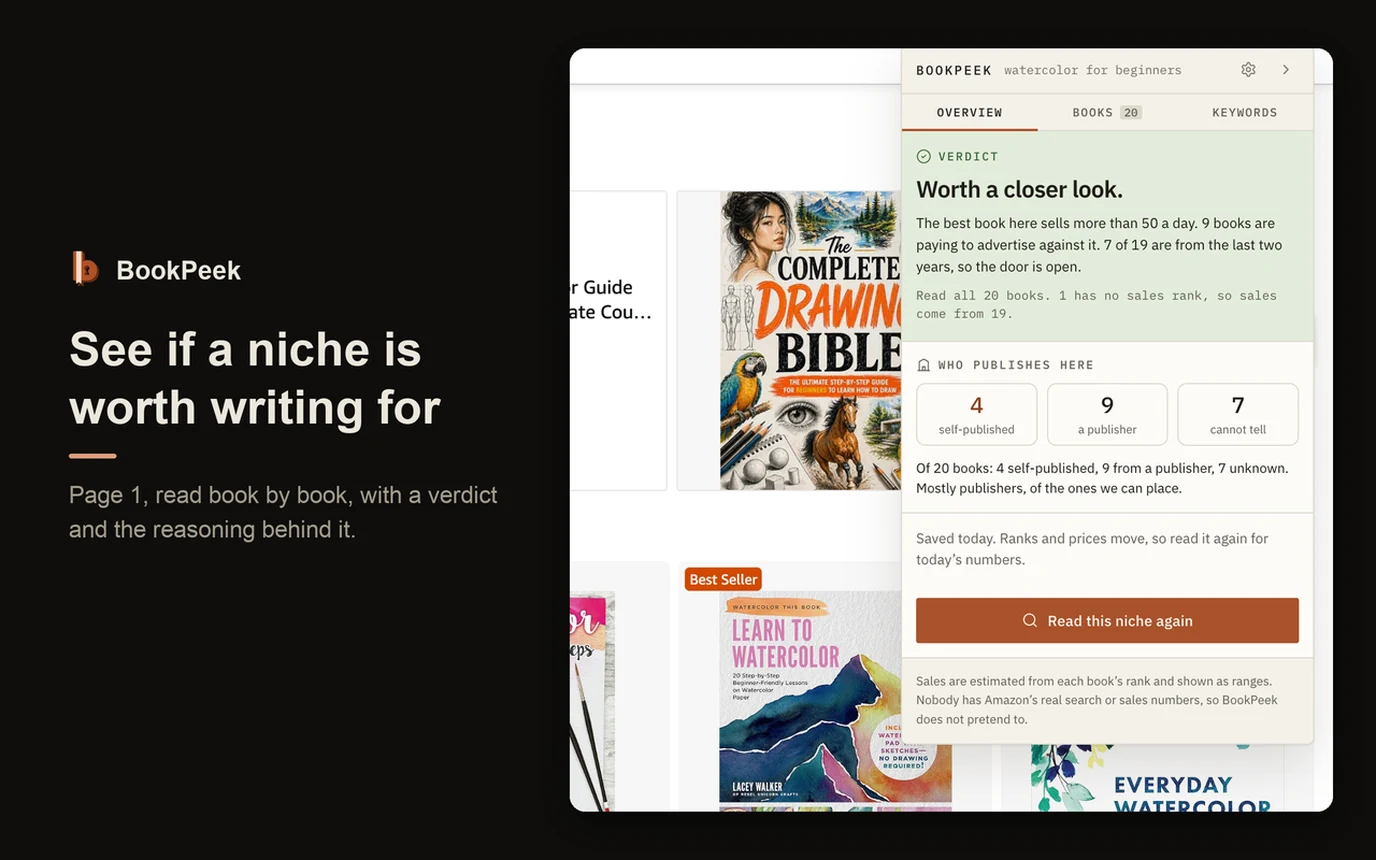
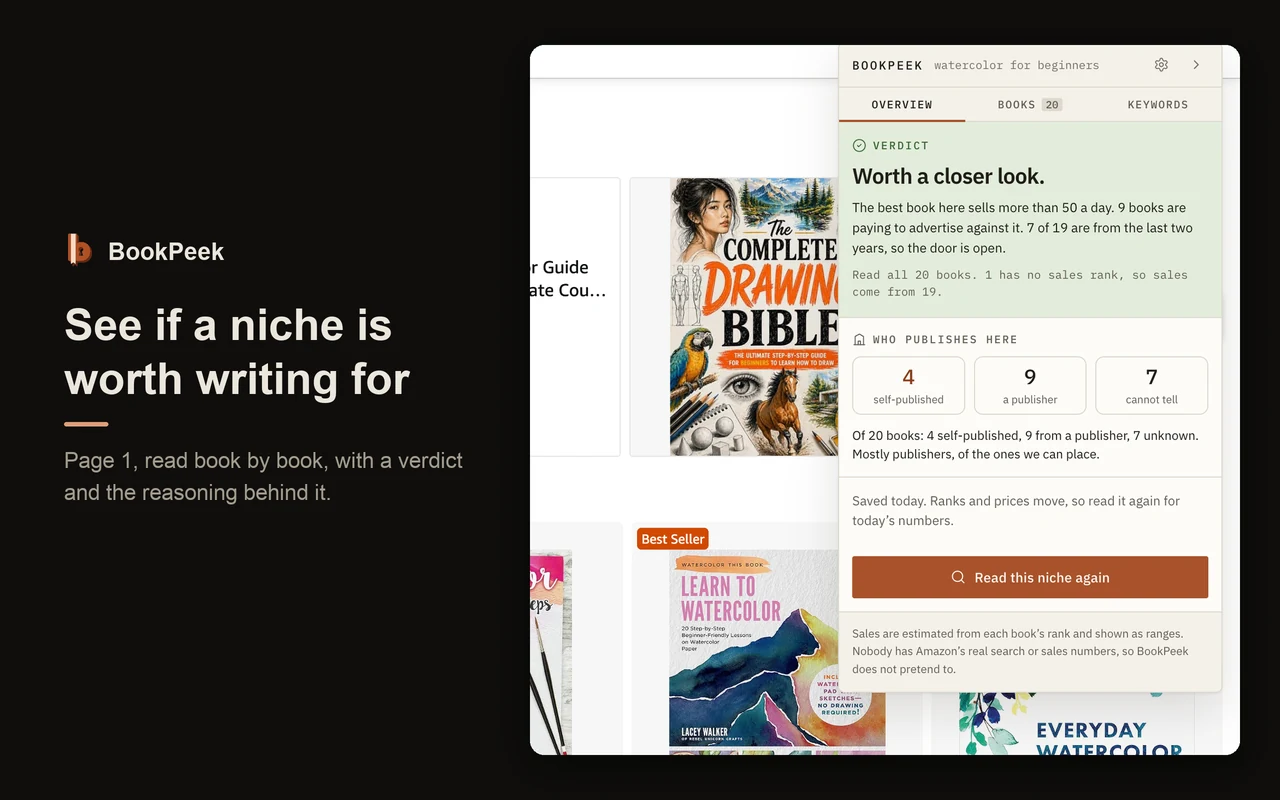
Not a score out of 100. A sentence in plain English, with the reasoning printed underneath it: what the best book sells, how many books are advertising, and how many arrived in the last two years.
It tells you how much it read
Every analysis says how many of page 1 it actually managed to open. A book whose page would not load is never quietly counted as a book that does not sell.
Sales as a range, never a figure
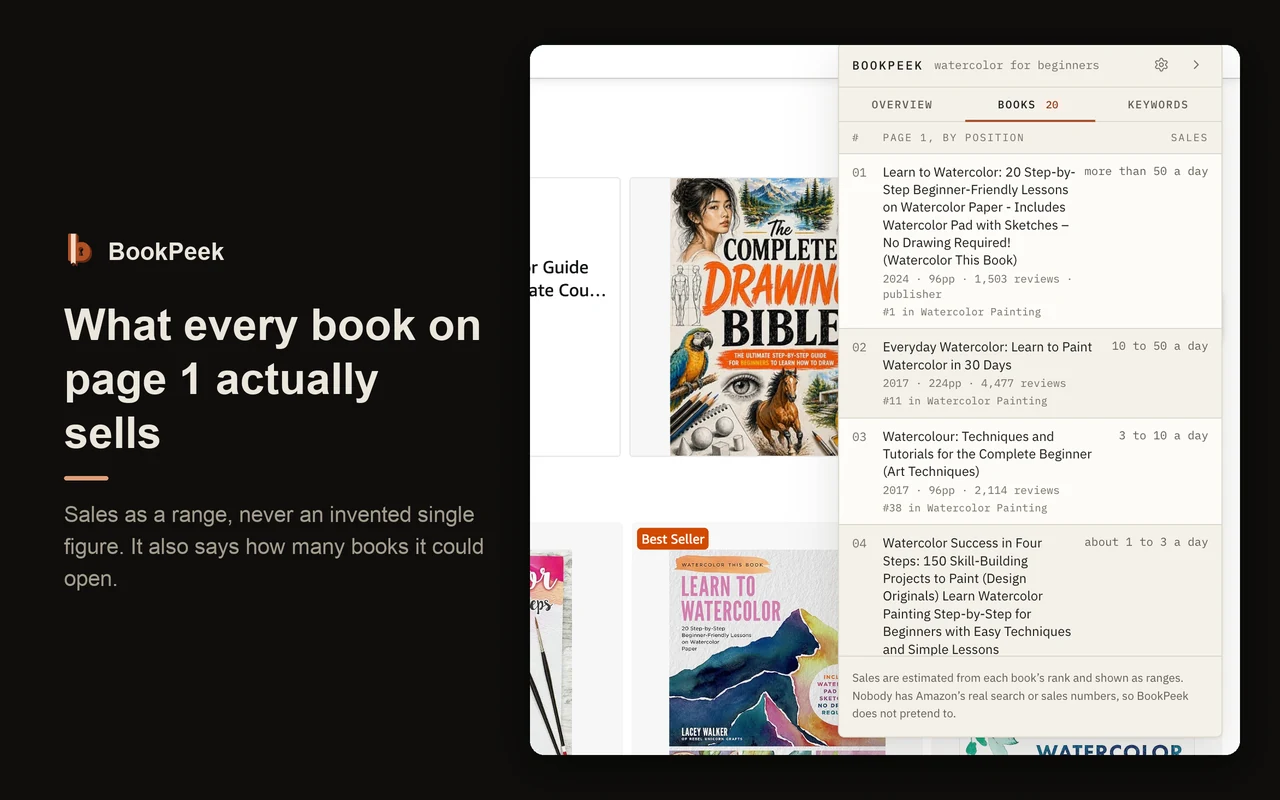
Amazon publishes a rank, not sales. Every estimate here is a range, because that is the only honest shape for it. A single number with a decimal point is a claim nobody can back.
The shelf each book really competes on
Not "#416,294 in Books", which tells an author nothing, but "#47 in Mammal Zoology" — the most specific category a book ranks in, which is the one worth knowing.
Who publishes in this niche
Three counts, never a percentage: self-published, a publisher, and cannot tell. The third is shown as plainly as the other two, because a small press and an author's own imprint look identical on Amazon.
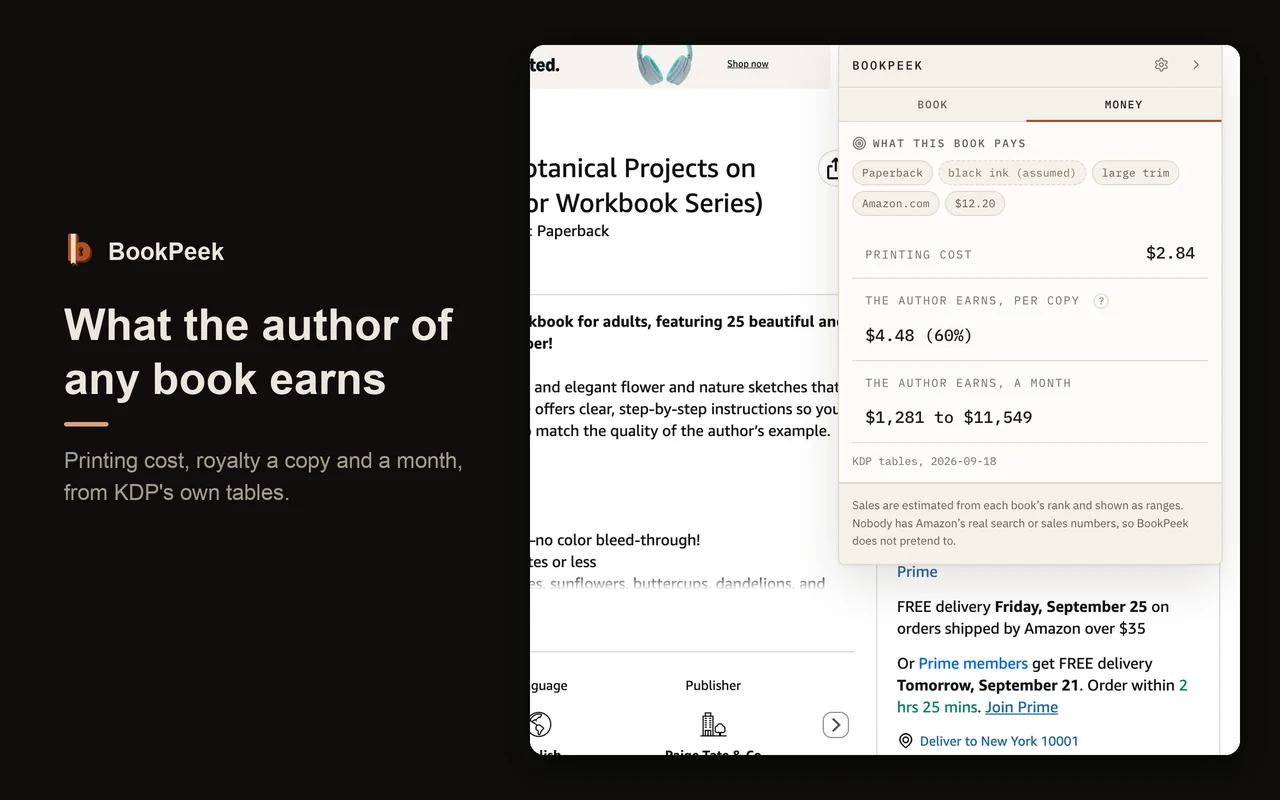
What any book's author earns
On a book page: the printing cost, the royalty per copy with the rate that applies, and what that comes to in a month at its current rank. From KDP's own published tables, with the date they were read on screen.
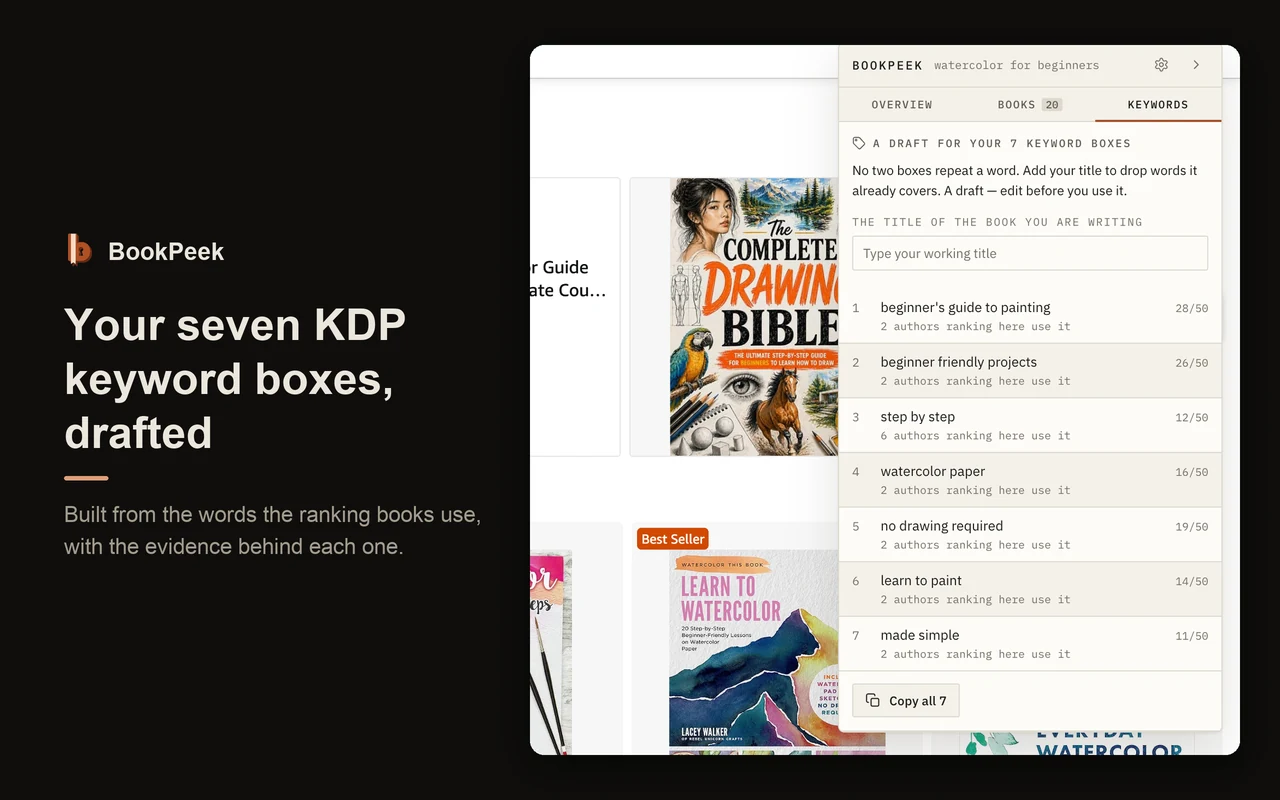
Your seven KDP keyword boxes, drafted
Built from the words the ranking books use, with the evidence beside each one — how many ranking authors use that phrase. No two boxes spend their words on the same thing. Fewer than seven is a normal answer.
What readers complain about
Through your AI app, BookPeek reads a sample of a book's reviews in full text. What readers of a winning book complain about is the gap you write into, and it is nowhere in the listing data.
What is inside the books beating you
Through your AI app, the first pages of a book's free Amazon sample, so it can see how a book is built before you outline yours. Off until you switch it on.
CSV export, and saved searches that sync
The whole table as a spreadsheet, with the date and the coverage on the first two lines. Saved searches follow you to your other computers through your own Chrome sync.
No account, no server, no search volume
Nothing to sign up for and nothing sent anywhere. And no invented search-volume number: nobody measures it for books, so BookPeek does not sell you one.
How to Research a Book Niche with BookPeek
Add BookPeek to Chrome
Install BookPeek from the Chrome Web Store. It opens on a worked example so you can see it read a real search straight away.
Search a book idea in Books
Search on Amazon with the department set to Books. BookPeek's panel appears beside the results. All Departments mixes books in with other products, so BookPeek asks you to search again in Books rather than judge a page that is part hardware.
Click Analyse this niche
BookPeek opens each of page 1's books in turn, slowly and one at a time, and reads its sales rank, age, page count and publisher. Twenty books take about a minute.
Read the verdict, then go deeper
Read the verdict and the reasoning, look at what each book sells, and open any book to see what its author earns. Connect your AI app to read the winners' reviews and samples.
Use BookPeek from Your AI App
BookPeek works as an MCP server, so an AI app can research a book niche for you in your own Chrome while you get on with writing.
- In BookPeek's settings, open the AI apps page and switch on Let AI tools use BookPeek.
- Add bookpeek-mcp to your AI app, as below. It needs Node.js 18 or newer.
- Restart the app. The first time it connects, BookPeek asks you in Chrome to Allow it.
Claude Code
Run this in your terminal, then restart Claude Code:
claude mcp add --scope user bookpeek -- npx -y bookpeek-mcpClaude Desktop, Cursor and other MCP apps
Add this to the mcpServers section of the app's MCP settings, then restart the app:
"bookpeek": { "command": "npx", "args": ["-y", "bookpeek-mcp"] }Then ask something like "Is 'watercolor for beginners' worth writing for, and what do readers complain about in the top three books?" Your app gets the same analysis as the panel, plus the things only a browser can reach: review text, and the first pages of a book's free sample. The connection stays on your computer, and BookPeek can read but never change anything.
Who BookPeek Is For
Self-publishers choosing the next book
Check a niche before you spend a month writing into it. See what the books winning it actually sell, how old they are, and whether publishers or authors own the page.
Low-content and colouring book publishers
The niches move fast and the margins are thin. See the trim size, the page count and what a book at that price really pays after printing.
Authors pricing a book
Work out the royalty before you publish: print or Kindle, any marketplace, both trim sizes, all four ink types, straight from KDP's tables.
Authors who work with AI
Give your AI app real data from Amazon instead of guesses — the ranking books, their reviews in the readers' own words, and what is inside their samples.
What BookPeek Does Not Do
- No search volume. Amazon publishes none for books, so nobody can sell you one honestly. BookPeek shows what the books already ranking are doing instead.
- No single sales figure. Sales are estimated from a rank and always shown as a range. A number with a decimal point would be a claim nobody can back.
- Amazon.com only, for now. The royalty calculator covers all eight KDP marketplaces, but the niche analysis reads the US store.
- Reviews need you signed in. Signed out, Amazon shows review text to nobody, so that part cannot work.
- No tracking over time yet. You can mark a book as yours and see where it ranks on a search, but rank history is not built.
Private by Design
- Read in your browser. Your searches, the books you look at and the results never go to a server of ours. There is no BookPeek server for them to go to.
- No analytics at all. BookPeek counts nothing — not on install, not on update, not when you use a feature. There is nothing to switch off because there is nothing being counted.
- No account. Saved searches and your own books sync to your other computers through Chrome's own sync.
- AI apps only when you say so. The connection is off by default, stays on your computer, and each app needs your Allow. It can read, never change.
- It never touches your Amazon account. No signing in, no forms, no buying, no posting, and no affiliate links anywhere.
Read the full BookPeek privacy policy and the terms of use.
BookPeek KDP Research Tool — FAQ
What is BookPeek?
BookPeek is a free Chrome extension for Amazon KDP book research. Search a book idea on Amazon and it reads page 1 for you: a verdict on whether the niche is worth writing for, what every book on the page sells, how old they are and who published them. On any book's page it works out what that book's author earns. It also has an MCP, so your own AI app can do the research for you.
Is BookPeek free?
Yes. BookPeek is free to install and use, with every feature on this page included. No account and no card. The bookpeek-mcp helper that AI apps use is open source under the MIT licence and also free.
Does BookPeek show search volume?
No, and that is deliberate. Amazon publishes no search volume for books. The figures other tools show are either a different Amazon metric that needs Brand Registry, or an undisclosed model. BookPeek shows you what the books that already rank are doing instead, which is measurable.
How accurate are the sales estimates?
They are estimates worked out from each book's sales rank, and they are always shown as a range because the honest error is wide. Nobody outside Amazon has real sales figures for a book. Anyone selling you a single precise number has the same rank BookPeek has, and a bolder rounding.
Do I need an Amazon account?
Not for the panel. The verdict, the sales estimates, the royalty figures and the keyword boxes all work whether you are signed in or not. Reading a book's reviews does need you signed in to Amazon in Chrome, because Amazon shows review text to nobody else.
Is it safe for my Amazon account?
BookPeek never signs in, never fills in or submits an Amazon form, and never buys, reviews or posts anything. It never sees or asks for your Amazon password. It reads the pages your browser has already been served, the way a reader would, and it carries no affiliate links.
Which Amazon marketplaces does it work on?
Amazon.com for now. The royalty calculator covers all eight KDP print marketplaces — the US, UK, Europe, Canada, Australia, Japan, Poland and Sweden — because the royalty rate steps are different in each and are not conversions of one another.
Does it work for Kindle books as well as paperbacks?
Yes. Kindle and print are different ranking pools and conflating them is the most common error in this category, so BookPeek keeps them apart. The royalty side covers Kindle too, including the 70 percent band and the delivery charge by file size.
How do I use BookPeek from my AI app?
Switch on "Let AI tools use BookPeek" on the AI apps page in BookPeek's settings, add bookpeek-mcp to your AI app (the settings page has the line to copy), restart the app and click Allow when BookPeek asks. Your AI app can then analyse searches, read book pages, sample reviews, compare books and work out royalties. It needs Node.js 18 or newer, and Chrome open.
Where are my saved searches stored?
In your own browser, and in your own Chrome sync so they appear on your other computers. BookPeek has no account and no server for them to go to.
Know Before You Write the Book
Add BookPeek to Chrome, search a book idea on Amazon, and see what the niche is worth in about a minute.
Available in the Chrome Web Store Add to Chrome — It's FreeBookPeek is not affiliated with or endorsed by Amazon.com, Inc. Amazon, Kindle and Kindle Direct Publishing are trademarks of Amazon.com, Inc.
Also see PinPeek, my Pinterest keyword tool, and Expando, my text expander for Chrome.