PinPeek
Who Owns This Pinterest Keyword, and Can You Beat Them?
PinPeek is a free Pinterest keyword research extension for Chrome. It sits beside your Pinterest search and shows which websites own the keyword, whether a new site can rank, the pins you can beat and what the winning pins look like. No account, nothing stamped on your pins, and it never touches your Pinterest account.
Free · No account · Analysed in your browser
What Is Pinterest Keyword Research, and Why It Matters
Pinterest is a search engine. People type what they want, like easy dinner recipes or fall decor ideas, and Pinterest shows the pins it thinks answer best. Pinterest keyword research is choosing which of those searches to make pins for, so your pins land where people are looking.
Picking a popular keyword is the easy part. The hard part is knowing whether you can win it. If a handful of big blogs own the top results with pins that have thousands of saves, a new pin will sink. If the top is full of weak, old or unlinked pins, a good pin can take its place. That difference decides whether a pin is worth making.
PinPeek answers exactly that question, on Pinterest itself. Search as you normally do, click Analyze, and see who you are up against and where the openings are, without leaving the page and without a monthly plan.
A Quiet Tool That Tells You Something Useful
Other Pinterest tools cover every pin with numbers and charge before they tell you anything useful. PinPeek sits beside your search and answers the question that decides whether a pin is worth making: which websites own this keyword, and can yours beat them. No account, nothing on your pins, and it never touches your Pinterest account.
It reads only the results Pinterest has already loaded for you. It never scrolls, clicks, saves or posts, and it does not collect every pin you browse. Everything is worked out in your browser, from the search in front of you.
See PinPeek in Action
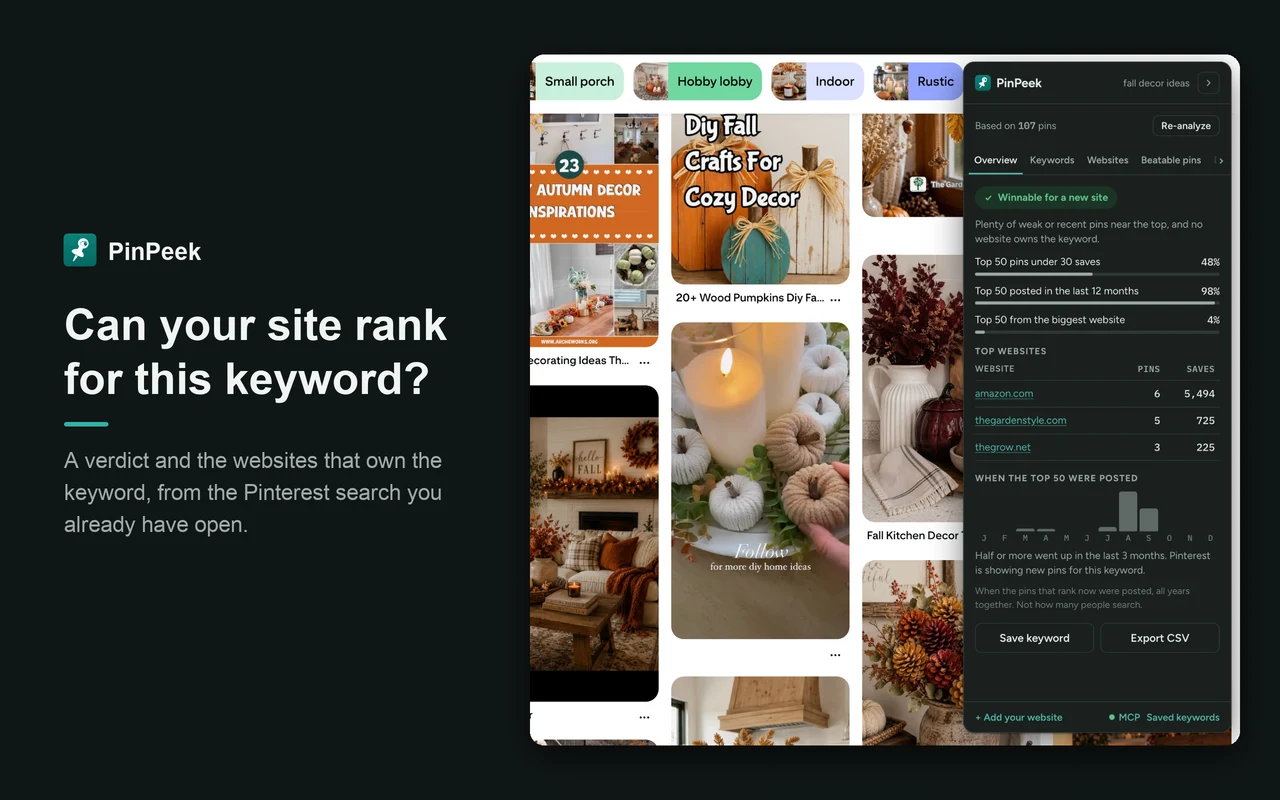
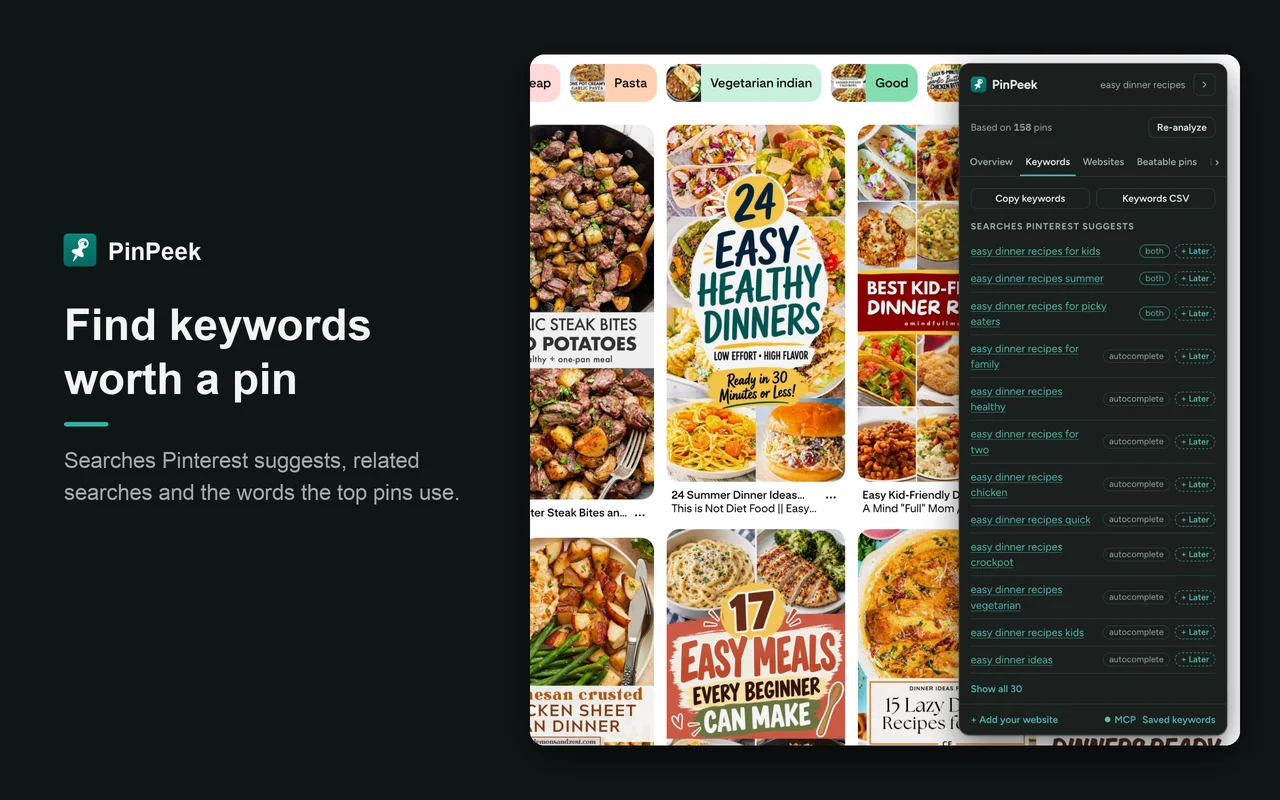
A one-minute demo, then real screenshots from Pinterest searches for fall decor ideas and easy dinner recipes. Click any screenshot to open it full size.
Everything PinPeek Does, Free
No trial, no locked tabs. Everything below is in the free extension.
Can a new site rank? A clear verdict
Winnable, possible or tough, with the numbers behind it: how many top pins have few saves, how many are recent, and how much of the top belongs to one website.
The websites that own the keyword
Every website in the results, with how many pins it has, their saves and its best position. See at a glance whether one blog dominates or the field is open.
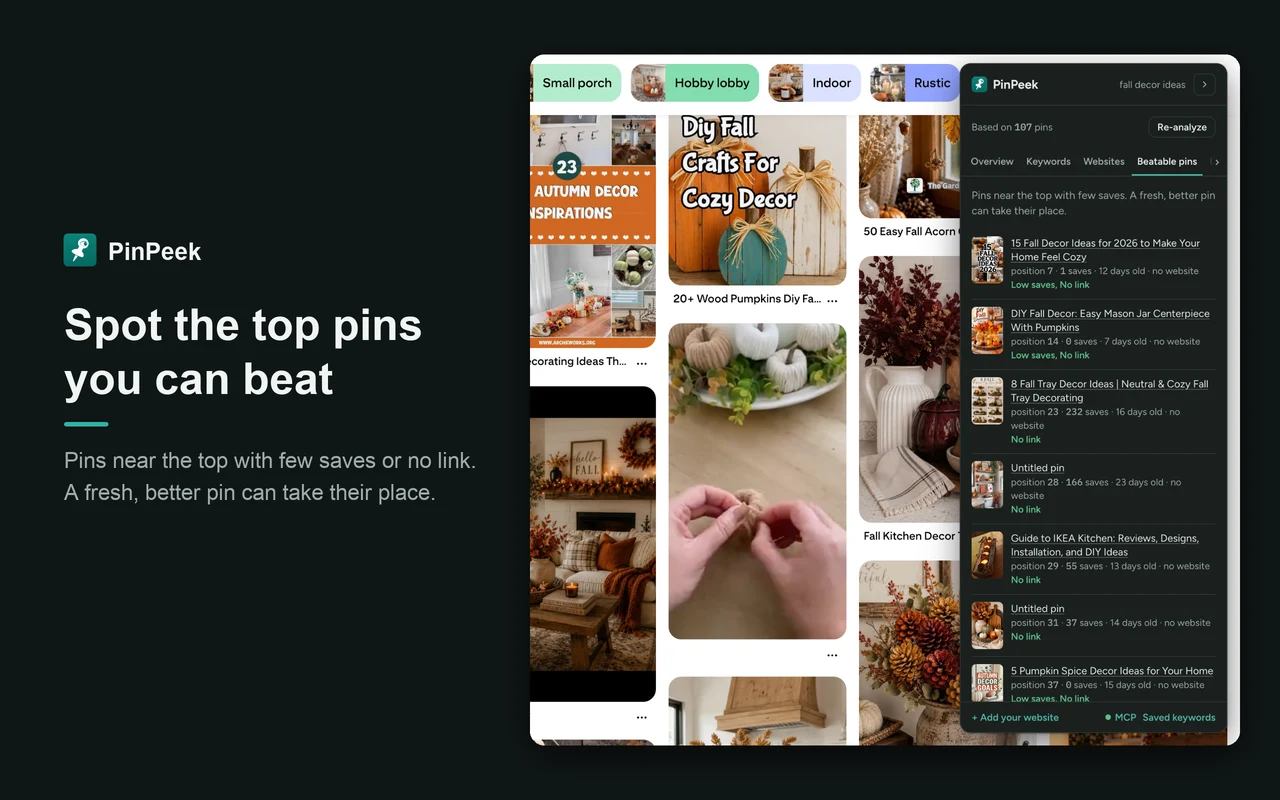
Beatable pins
Top pins with few saves, no link or an old date. These are the spots a fresh, better pin can take, with a gallery and a larger view of each one.
Your own sites highlighted
Add your websites once and PinPeek marks your pins everywhere, so you see where you already show up and where you do not.
Keyword ideas from Pinterest itself
The searches Pinterest suggests, related searches and the words the top pins use. Copy them, export them, or keep one for later with a click.
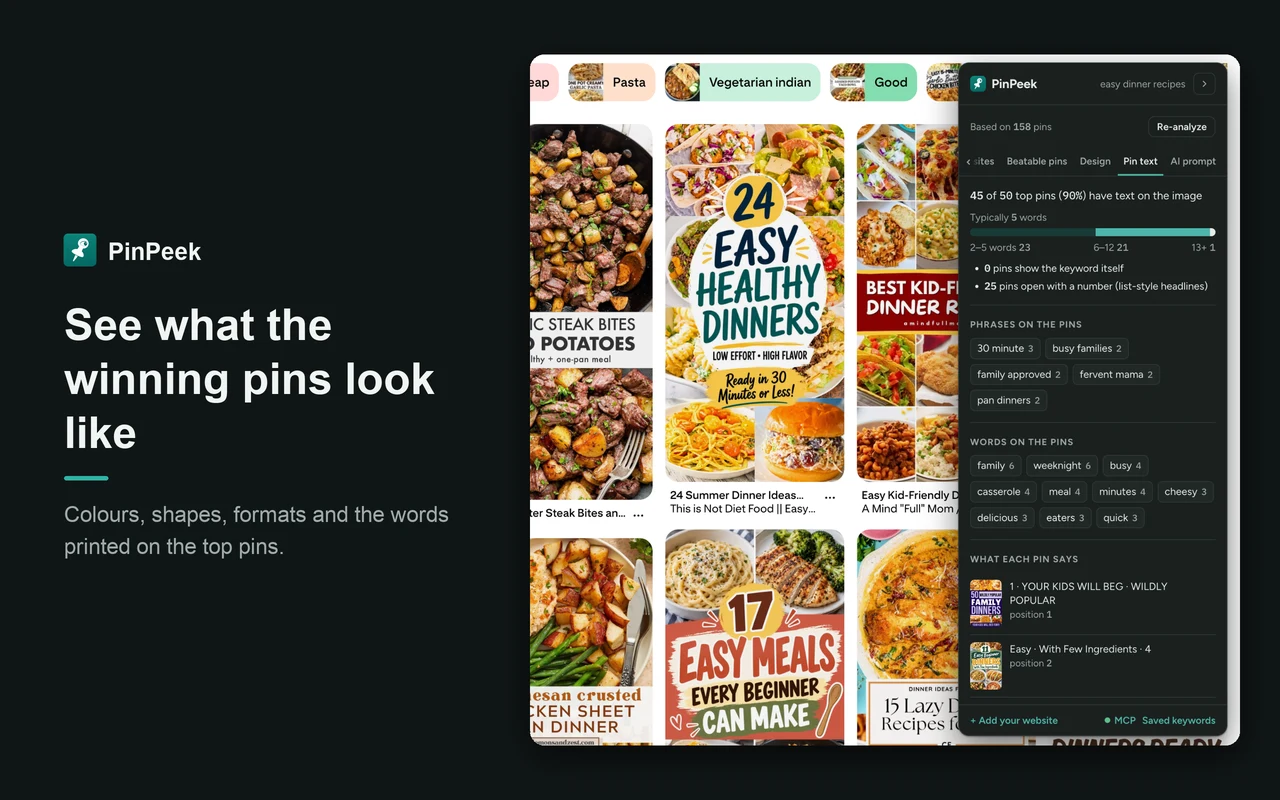
What the winning pins look like
The colours of the top pins as hex codes, light or dark, muted or vivid, pin shapes, and how many are images, videos or multi-slide pins.
Text on the top pins
How many top pins have text on the image, how many words they use, common phrases, and what each pin says. Read on your computer. PinPeek never guesses fonts.
When the top pins were posted
A month-by-month chart of when the pins ranking now went up, so you can tell a fresh keyword from one held by old pins, and spot seasonal ones.
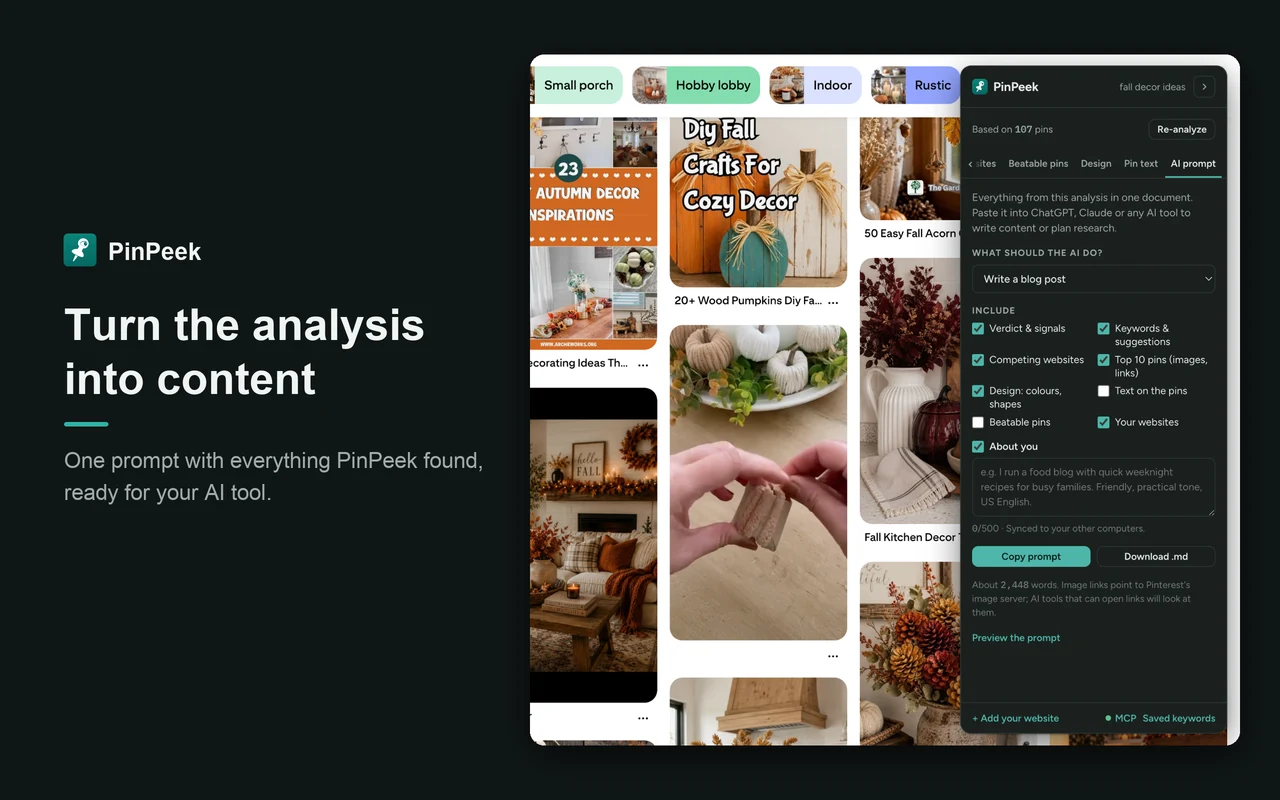
An AI prompt with the whole analysis
Pick a task (a blog post, pin titles and descriptions, a design brief, keyword research or a report) and copy one prompt with everything PinPeek found into your AI tool.
Saved keywords, and what changed
Save an analysis, analyse it again later and see what moved. Compare keywords side by side and export to CSV. Saved keywords sync to your other computers through Chrome.
Use it from AI apps
Claude Code, Claude Desktop, Cursor and other MCP apps can ask PinPeek to analyse a keyword for you, in your own logged-in Chrome. You allow each app once.
Nothing on your pins, nothing automated
PinPeek sits in a small panel at the side. It never stamps numbers over pins, and it never scrolls, clicks, saves or posts for you.
How to Research a Pinterest Keyword with PinPeek
Add PinPeek to Chrome
Install PinPeek from the Chrome Web Store and log in to Pinterest in Chrome. A short tour starts on a real search.
Search a keyword on Pinterest
Search as you normally would. The PinPeek panel appears beside the results and counts the pins as they load.
Scroll, then click Analyze
Scroll a few times so PinPeek reads more pins, then click Analyze. The verdict, websites, beatable pins, keywords and design appear in the panel.
Add your website
Enter your website once and PinPeek highlights your own pins in every analysis. Save the keyword to see what changed next time.
Use PinPeek from Claude, Cursor and Other AI Apps
PinPeek works as an MCP server, so an AI app can analyse Pinterest keywords for you in your own logged-in Chrome while you work.
- In PinPeek's options, open the MCP page and switch on Let AI tools use PinPeek.
- Add pinpeek-mcp to your AI app, as below. It needs Node.js 18 or newer.
- Restart the app. The first time it connects, PinPeek asks you in Chrome to Allow it.
Claude Code
Run this in your terminal, then restart Claude Code:
claude mcp add --scope user pinpeek -- npx -y pinpeek-mcpClaude Desktop, Cursor and other MCP apps
Add this to the mcpServers section of the app's MCP settings, then restart the app:
"pinpeek": { "command": "npx", "args": ["-y", "pinpeek-mcp"] }Then ask something like "Analyze 'easy dinner recipes' with PinPeek and tell me which websites I would be competing with." The app gets the same analysis as the panel, from the pins Pinterest loads first, in a background tab that closes when it is done. It can also read your saved keywords. The connection stays on your computer.
Who PinPeek Is For
Bloggers who get traffic from Pinterest
Check a keyword before you write the post and make the pins. If three big sites own it, pick a longer one where the top pins are weak.
Pinterest managers and VAs
Show a client who they are up against, which pins to beat and what the winners look like, in a few minutes per keyword.
Shop and product owners
Find the searches where the top pins are thin, and see the colours, formats and words that already work there.
Anyone planning pins with AI
Hand your AI tool real data from the search instead of guesses, through the prompt or straight from an AI app.
What PinPeek Does Not Do
- No search volume. PinPeek tells you who you are up against and whether you can win, not how many people search for a keyword.
- No logged-out analysis. Logged out, Pinterest hides the saves and websites PinPeek reads, so you need to be logged in to Pinterest in Chrome.
- No automation. It never scrolls, clicks, saves, follows or posts. The more you scroll yourself, the bigger the sample.
Private by Design
- Analysed in your browser. The pins, keywords and results never go to a server of ours. There is no PinPeek server for them to go to.
- Text on pins stays on your computer. Pin images are read by text recognition inside the extension and never uploaded.
- No account. Saved keywords and your websites sync to your other computers through Chrome's own sync.
- AI apps only when you say so. The AI app connection is off by default, stays on your computer, and each app needs your Allow.
- No ads, no tracking of your searches. PinPeek only sends anonymous counts of which features get used, never keywords, and you can switch that off in Settings.
Read the full PinPeek privacy policy.
PinPeek Pinterest Keyword Tool — FAQ
What is PinPeek?
PinPeek is a free Chrome extension for Pinterest keyword research. It sits beside your Pinterest search, reads the results Pinterest has loaded for you, and shows which websites own the keyword, whether a new site can rank for it, the pins you can beat and what the top pins look like.
Is PinPeek free?
Yes. PinPeek is free to install and use, with every feature on this page included. No account and no card.
Why do I need to be logged in to Pinterest?
When you are logged out, Pinterest hides the saves, titles and websites of the pins in search results, so there is almost nothing to analyse. PinPeek uses your normal logged-in session and never asks for your Pinterest password.
Does PinPeek show search volume?
No. PinPeek tells you who you are up against and whether you can win a keyword, not how many people search for it. Search volume is a different question, and the tools that show it collect it on their own servers.
Is it safe for my Pinterest account?
PinPeek never scrolls, clicks, saves, follows or posts. In the panel it works from the results Pinterest already loaded in your tab, and the pin images you see. When you let an AI app use it, it opens the search in a normal background tab, the same as you would. It never asks for your Pinterest password.
How many pins does it analyse?
As many as you scroll past. Scroll a few times before you click Analyze: the more pins PinPeek reads, the sharper the analysis. Every result says how many pins it used.
Does it work outside the US?
Yes. PinPeek works on pinterest.com and Pinterest's country sites, including the UK, Canada, Australia, Germany, France, Spain, Italy, Japan and Mexico.
How does "Text on pins" work, and are my images uploaded?
PinPeek reads the words on the top pins with text recognition that is built into the extension and runs on your computer. The images are never uploaded anywhere.
How do I use PinPeek from Claude or Cursor?
Switch on "Let AI tools use PinPeek" on the MCP page in PinPeek's options, add pinpeek-mcp to your AI app (the MCP page has the text to copy), restart the app and click Allow when PinPeek asks. Your AI app can then analyse keywords and read your saved keywords. It needs Node.js 18 or newer, and Chrome open.
Where are my saved keywords stored?
In your own browser, and in your own Chrome sync so they appear on your other computers. PinPeek has no account and no server for them.
Know Before You Make the Pin
Add PinPeek to Chrome, search a keyword on Pinterest, and see who owns it in under a minute.
Available in the Chrome Web Store Add to Chrome — It's FreePinPeek is not affiliated with or endorsed by Pinterest, Inc. Pinterest is a trademark of Pinterest, Inc.
Also see Expando, my text expander for Chrome, and my WordPress plugins.