How to Check Pinterest Keyword Competition Before You Make a Pin
Almost every Pinterest keyword guide is about search volume. Volume tells you people want something. It says nothing about whether your pin can get anywhere near the top of the results. That second question is keyword competition, and it's the one that decides whether a pin is worth making.
Disclosure: I built PinPeek, the Chrome extension used in the second half of this post, and I run Pinterest traffic for my own sites, including theturtlehub.com, which turns up in the example. The numbers below come from a Pinterest search I ran on September 15, 2026, logged in to my own account. PinPeek is not affiliated with or endorsed by Pinterest.
What "Competition" Means on Pinterest
On Google, competition is about links and domain strength. On Pinterest it comes down to three things you can see in the search results themselves:
- Who owns the top pins. Twenty different blogs in the top 50 is an open field. One website with a third of the spots is not.
- How strong those pins are. Pins with thousands of saves have been proven by Pinterest over and over. Pins with a handful of saves are holding their spot loosely.
- How fresh they are. Pinterest likes fresh pins. A top result from four years ago with 20 saves is a spot a good new pin can take.
None of this shows up as a number anywhere in Pinterest. Pinterest has no keyword difficulty score, and the search grid shows almost no stats. So you either work it out by hand or use a tool that reads it for you.
Checking Competition by Hand
You can do all of this from Pinterest's own search page. It's slow, but it works, and it's worth doing once so you know what a tool is doing for you.
- Search the keyword while logged in. Results differ a little between accounts, so use the one you pin from.
- Scroll until you've seen about 50 pins. The first screen is usually 15 to 25 pins, which is too few to judge.
- Open each top pin and write down the website it links to. A spreadsheet with position, website and anything you can see about saves or age is enough.
- Count websites. If one domain appears again and again, that site owns the keyword.
- Mark the weak spots. Pins with no link, pins that are clearly old, and pins that don't really match the search are the places a new pin can land.
For 50 pins this takes 30 to 45 minutes. The part that hurts is that Pinterest hides most of what you need: the grid shows titles, not saves, and plenty of pins don't show their date at all.
Signs a Keyword Is Winnable
- Lots of low-save pins near the top. If most of the top 50 have under 30 saves, the bar is low.
- Old pins holding top spots. Several top pins from two, three or four years ago means Pinterest hasn't found anything better yet.
- Many different websites. A spread of blogs, each with one or two pins, means no one owns it.
- Pins that miss the search. A "turtle tank" search showing tortoise tables is Pinterest filling gaps.
And the sign that overrides all of these: one website holding a big share of the top pins. Weak pins don't help you much if the same site keeps publishing new ones for that search.
The Same Check in About a Minute With PinPeek
PinPeek does the counting part for you, from the results already loaded in your browser. It never scrolls or clicks for you; you search and scroll the way you normally would, and a panel beside the results counts the pins as they load.
- Search the keyword on Pinterest and scroll a few times.
- Click Analyze in the PinPeek panel.
- Read the verdict: winnable, possible or tough for a new site, with the numbers behind it and how many pins it used.
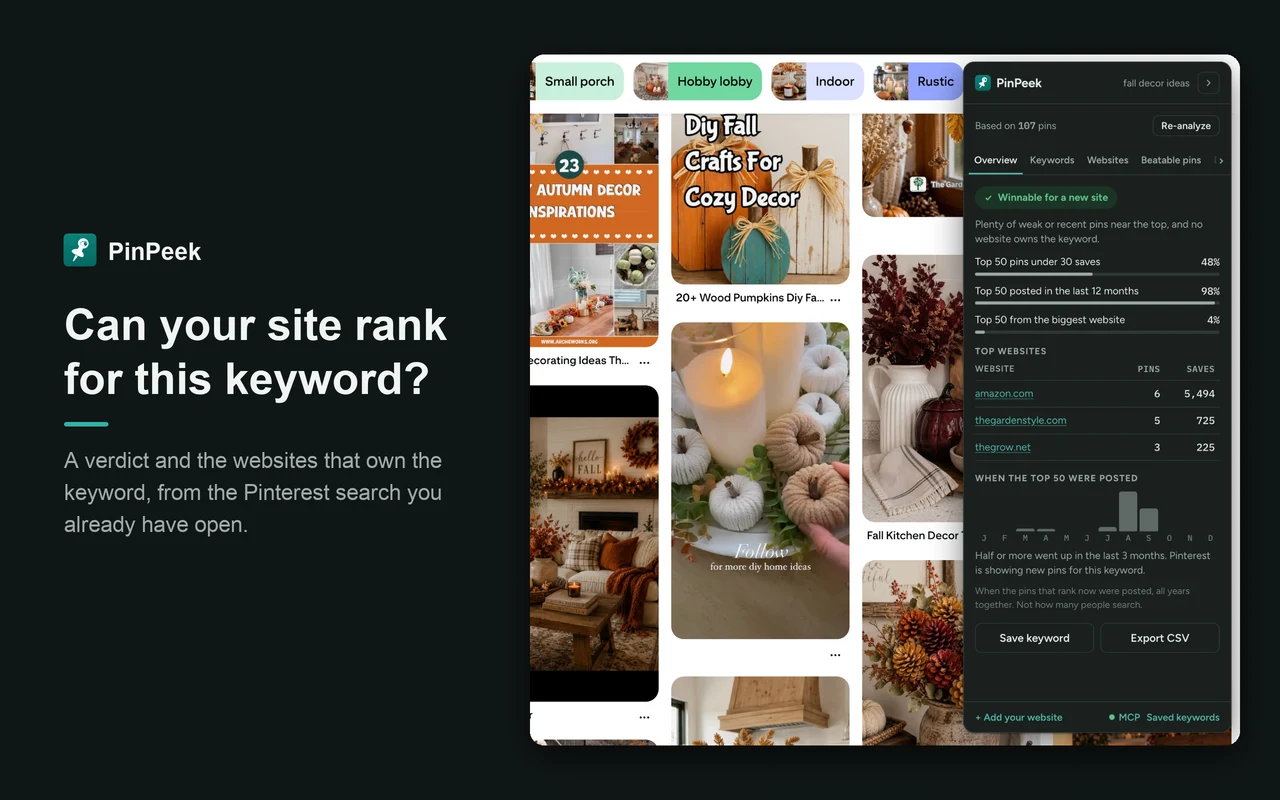
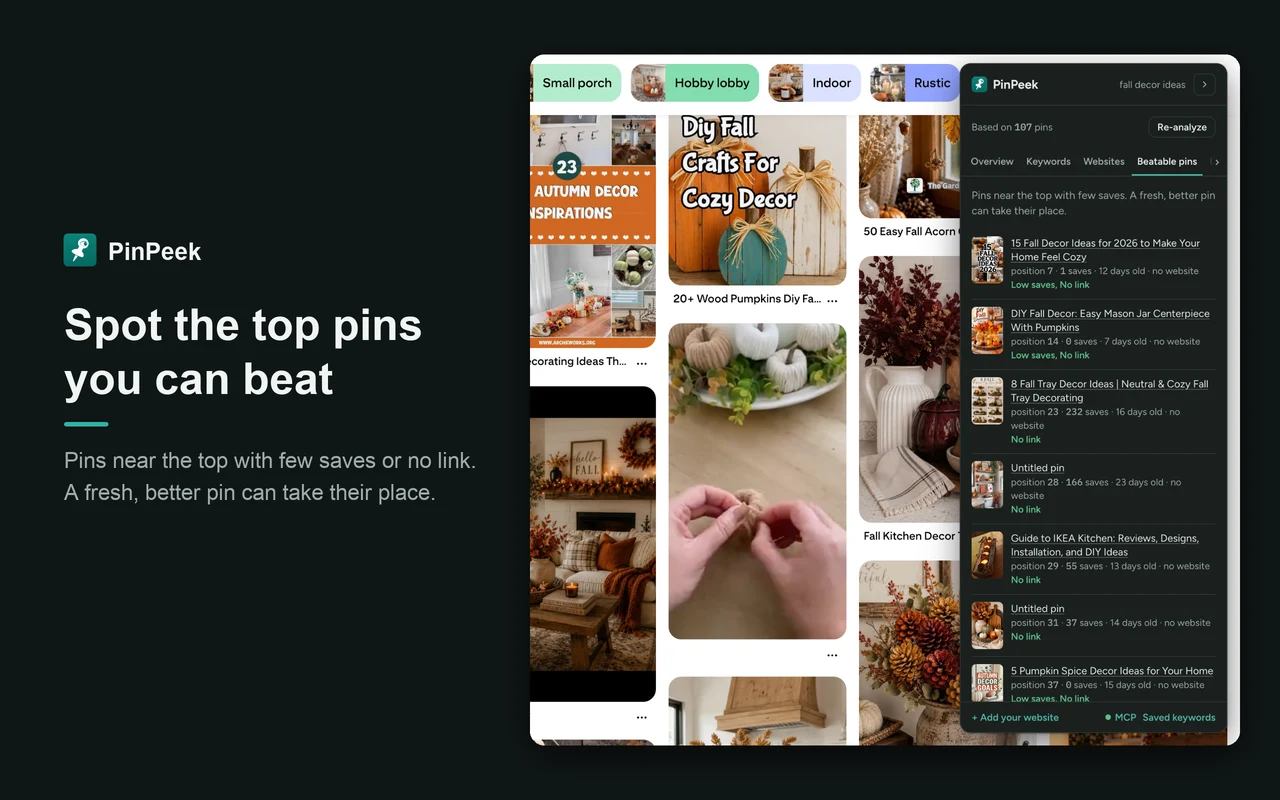
Beyond the verdict, the panel shows the websites that own the keyword with their pins and saves, a Beatable pins list (top results with few saves, no link or an old date), when the top pins were posted, and what the winning pins look like: their colours, shapes, formats and the words printed on them.
A Real Example: "turtle tank ideas"
I searched turtle tank ideas on September 15, 2026, scrolled until PinPeek had read 87 pins, and clicked Analyze. Here's what came back.
| Signal (top 50 pins) | Result |
|---|---|
| Verdict for a new site | Tough |
| Pins under 30 saves | 76% |
| Pins posted in the last 12 months | 62% |
| Pins from the biggest website | 40% |
Look at the second row first. Three out of four top pins have fewer than 30 saves. By that signal alone, the keyword looks wide open. The verdict still says tough, and the last row is why: a single website holds 40% of the top 50.
That website is mine. theturtlehub.com had 28 of the 87 pins read (478 saves between them), far ahead of aquanswers.com with 4 and garden.eco with 2. For me this keyword is working. For a new site starting today, it's a hard one to break into, even though the individual pins are weak. That's exactly the case a save-count check misses.
There are still openings. The Beatable pins list included a pin at position 11 from aquanswers.com with 2 saves, three years old; one at position 12 from crittermamas.com with 29 saves, four years old; and one at position 14 from nursingpets.com with 23 saves, four years old. The posting dates were spread across the year, so there's no season to wait for.
If I were a new turtle blog, I wouldn't chase "turtle tank ideas" head on. I'd take the narrower searches Pinterest suggested for it, like turtle tank ideas half water half land or turtle tank ideas 10 gallon, and check each of those the same way.
What Competition Can't Tell You: Demand
A keyword can be easy to win because nobody searches for it. Competition and demand are separate checks, and PinPeek only does the first one. It does not show search volume.
For demand, start with Pinterest Trends. It's free and shows how interest in a search moves over time on a 0 to 100 scale. For "turtle tank ideas" it peaked around September 2025 and was sitting at about 40 in September 2026: still searched, just past its high. If you want estimated volume numbers, you'll need a paid tool; I compare them in the free Pinterest keyword tools I tested and in PinClicks alternatives.
A simple order that works: find the idea in Pinterest's search suggestions, check demand in Trends, check competition in the results, then make the pin. Once it's live, make sure your site is ready for the traffic; my WordPress Pinterest traffic guide and the post on Pinterest SEO for bloggers' images cover that side.
Try It on Your Next Keyword
PinPeek is free as of September 2026, needs no account, and works on Pinterest search pages while you're logged in. It reads only the pins Pinterest has already loaded in your tab. If you use Claude or another AI app that supports MCP, it can also run the analysis for you. Get PinPeek on the Chrome Web Store.
Frequently Asked Questions
Is there a free way to check Pinterest keyword competition?
Yes. You can do it by hand from Pinterest's own search results: note which websites the top pins link to, how strong and how old those pins look, and whether one site holds many of the spots. PinPeek, a Chrome extension I built, does the same check from the results you have loaded and is free as of September 2026.
How many pins should I look at?
At least the top 50. The first screen of results is usually 15 to 25 pins, which is too few to tell whether one website owns a keyword or just got lucky with a pin or two. Scroll a few times before you judge.
Does Pinterest show keyword difficulty?
No. Pinterest shows no difficulty score and no save counts in the search grid. Pinterest Trends shows how interest in a search changes over time, on a 0 to 100 scale, but nothing about how hard it is to rank.
Can a new Pinterest account rank for a keyword?
It can, on keywords where the top pins are weak or old and no single website holds a big share. On keywords one strong site dominates, a new account usually does better picking a narrower search first.
Pinterest is a trademark of Pinterest, Inc. PinPeek is not affiliated with or endorsed by Pinterest.