PinClicks Alternatives: See Who Ranks for a Pinterest Keyword Without $249 a Year
PinClicks is the tool a lot of Pinterest bloggers swear by, and it earns it. It also costs $29 a month or $249 a year, and a good part of what people use it for is one question: who ranks for this keyword, and can I beat them? These are the alternatives, and what each one is actually good for.
Disclosure: I built PinPeek, one of the alternatives below, and I'm a paying PinClicks user. I used PinClicks, SortPin, Pinterest Pin Stats and PinWise on the same search ("turtle tank ideas") in my own logged-in Chrome on September 14, 2026. Prices and user counts were checked again on September 15, 2026. I haven't used Pin Inspector, and I say so where it comes up. PinPeek is not affiliated with or endorsed by Pinterest.
First, What PinClicks Does Well
It would be odd to pay for a tool and pretend it's bad. PinClicks is good at the things its happiest users mention:
- Search volume. Its Keyword Explorer shows volume numbers for Pinterest keywords, which Pinterest itself doesn't publish.
- Annotations. It shows the topics Pinterest attaches to pins. Several of its reviewers credit these with the biggest change to their results.
- Top pins with saves. The Top Pins table lists the leading pins for a keyword with their saves, age and website.
- Rank tracking. Pin Pro tracks 25 keyword rankings; Pin Plus tracks 5,000 and emails you when a pin is flagged as AI Modified.
If you want all of that in one place and research keywords every week, it's worth the money. I keep paying for it.
Why People Look Elsewhere
- Price. Pin Pro is $29 a month or $249 a year. Pin Plus is $49 a month or $399 a year. There is a free trial.
- It's a web app with an account. You research in PinClicks, then go back to Pinterest to act on it.
- No summary of who owns a keyword. Each pin row shows its website, but you add up the domains yourself to see whether one site dominates.
- No "can I rank?" answer. It gives you the data; judging whether a new site can win is up to you.
The Alternatives at a Glance
| Tool | Price | Who owns the keyword | Can you rank | Beatable pins | Search volume | Account |
|---|---|---|---|---|---|---|
| PinClicks | $249/yr | Website per pin, no summary | No | No | Yes | Required |
| SortPin | Free; $29/yr | No | No | No | No | None |
| Pinterest Pin Stats | Free; $21 or $72/yr | No | No | No | $72/yr plan | None |
| PinWise | Free; $39/yr | Pro | Pro | No | Pro | None, terms to accept |
| Pin Inspector | $67 once | Not tested | Not tested | Not tested | Via Keywords Everywhere (not tested) | Licence |
| PinPeek | Free as of Sept 2026 | Yes, summarised | Yes | Yes | No | None |
The Alternatives
1. PinPeek
My extension, launched on the Chrome Web Store in September 2026. You search on Pinterest as usual, scroll, and click Analyze. A panel beside the results shows a verdict for a new site (winnable, possible or tough), the websites that own the keyword with their pins and saves, beatable pins (top results with few saves, no link or an old date), when the top pins were posted, and what the winners look like: colours, shapes, formats and the words printed on them. Keyword ideas come from Pinterest's own suggestions. It stamps nothing on pins and needs no account. It's free as of September 2026.
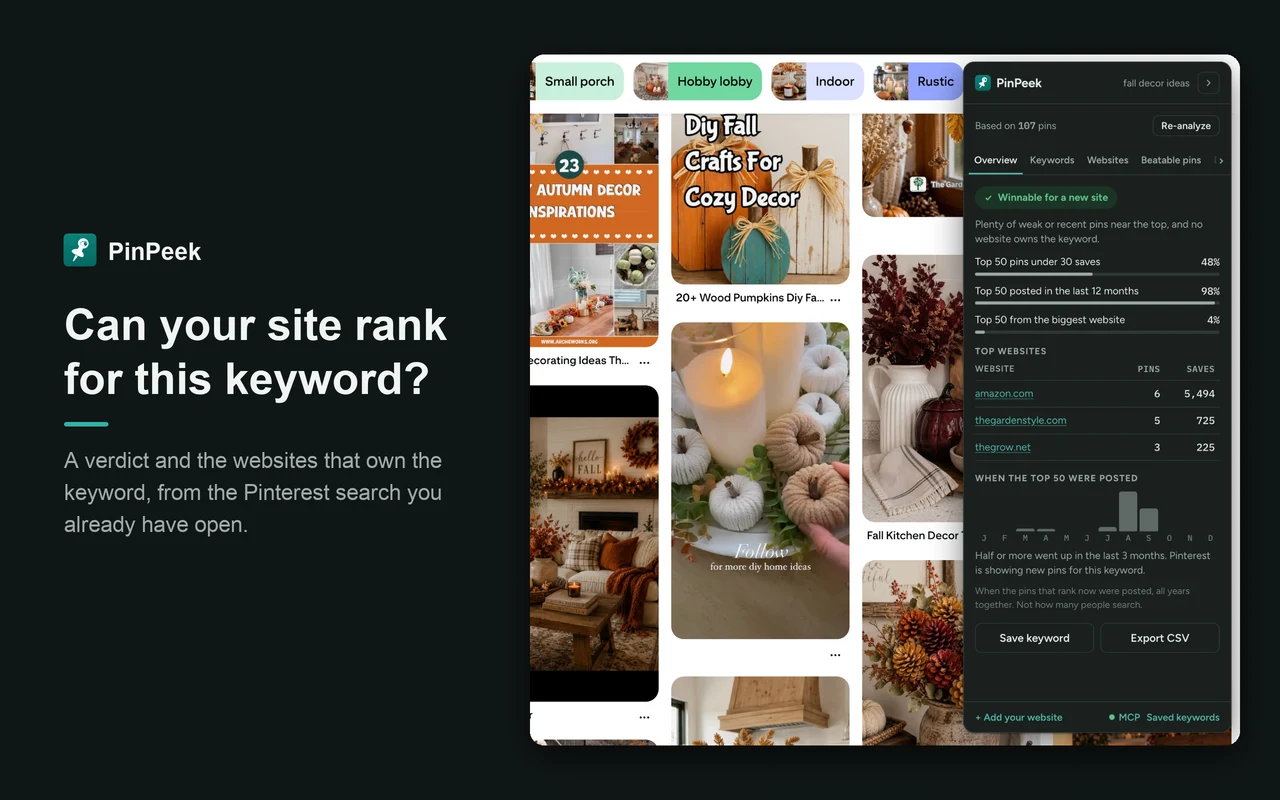
Where it falls short: no search volume, so it can't tell you how many people search a keyword. It's brand new, with no track record. It needs you logged in to Pinterest, and it only analyses the pins you've scrolled past, so a lazy scroll means a small sample (it tells you the sample size every time).
Good for deciding whether a keyword is worth a pin. There's a walkthrough with a real example in how to check Pinterest keyword competition. Get it on the Chrome Web Store.
2. SortPin
The most-installed Pinterest stats extension, with 40,000 users. It adds stats to every pin in the grid and lets you sort results by saves, date and more, which makes the strongest pins for a search easy to spot. The free plan covers the stats, sorting and filtering out ads and AI pins.
Where it falls short: it looks at pins one at a time, with no view of a keyword as a whole: no websites summary, no verdict. The badges cover a large part of each pin image. CSV export and some layout options are paid ($9 a month, $29 a year or $59 lifetime, up to 5 devices), and it showed an upgrade prompt on my first search.
Good for finding the most-saved pins in any search, for inspiration.
3. Pinterest Pin Stats (InsightPins)
10,000 users. Shows saves, likes, comments and dates in a slim column beside each pin, and sorts by likes, comments or date for free. Its reviewers like that it's quiet and not pushy, and I'd agree. It also has a Keyword Explorer with related keywords.
Where it falls short: no websites summary or rank verdict. Search volumes need Extended Pro at $72 a year; Pro ($21 a year) adds filters, any-column sorting and export, but not volumes.
Good for the cheapest way to get Pinterest search volumes, if volume is what you're after.
4. PinWise
The closest thing to a PinClicks-style verdict in an extension. Its free plan has stat overlays, a viral score, sorting and CSV export with no account. Pro has eight research tools, including a websites view ("Source Hunter"), a niche verdict of go, maybe or skip ("Niche Health") and keyword volumes. Pro is $7.99 a month, $39 a year (half price for the first year for its first 100 users) or $59 lifetime.
Where it falls short: everything that looks at a keyword as a whole is in Pro. It's also very new, with 51 users on September 15, 2026. You accept its terms on a dashboard tab before you start.
Good for anyone who wants volume and a verdict in one extension for a one-time $59.
5. Pin Inspector
A desktop app for Windows and Mac rather than an extension, sold for a one-time $67 (its site lists a coupon that brings it to $47). It advertises a keyword generator, analysers for pins, boards and accounts, and search volume and difficulty through the Keywords Everywhere API.
Where it falls short: I haven't used it, so I can't tell you how well any of that works. Going by its site, volume depends on a separate Keywords Everywhere plan. Its Chrome extension listing was last updated in March 2025.
Good for people who'd rather pay once for a desktop tool than subscribe.
Which One Should You Pick?
- You need search volume and rank tracking: stay with PinClicks, or try Pinterest Pin Stats Extended Pro for less.
- You want to pay once: PinWise lifetime, or Pin Inspector if a desktop app suits you.
- You want to know who owns a keyword and whether you can beat them: PinPeek, free as of September 2026.
- You just want to see the most-saved pins in a search: SortPin or Pinterest Pin Stats, free.
Plenty of people will end up with two: a free tool for the everyday "is this keyword worth it?" check, and one paid volume tool. That's roughly what I do. For the full list of free options, including Pinterest's own tools, see the best free Pinterest keyword research tools. And once the pins are live, my WordPress Pinterest traffic guide covers the site side.
Frequently Asked Questions
Is there a free PinClicks alternative?
For seeing which websites own a Pinterest keyword and whether a new site can rank, PinPeek does it free as of September 2026. For pin stats on every pin, SortPin, Pinterest Pin Stats and PinWise all have free plans. None of the free options show Pinterest search volume the way PinClicks does.
Which tools show Pinterest search volume?
Of the tools covered here, PinClicks, Pinterest Pin Stats on its Extended Pro plan ($72 a year) and PinWise Pro show search volume numbers. Pin Inspector says it gets volume through the Keywords Everywhere API. Every one of them charges for it.
Is PinClicks worth it?
If you research Pinterest keywords every week and want search volumes, pin annotations and rank tracking in one place, yes. If you mainly want to know who owns a keyword and whether you can beat them, a cheaper or free tool covers that.
PinClicks, SortPin, Pinterest Pin Stats, PinWise and Pin Inspector are the names of their respective owners. Pinterest is a trademark of Pinterest, Inc. PinPeek is not affiliated with or endorsed by Pinterest.