The Best Free Pinterest Keyword Research Tools, Tested
Search for the best free Pinterest keyword tool and most of what you'll find are lists written by one of the tools on the list. So I tried the free versions myself, on the same search, to see what each one actually gives you for nothing.
Disclosure: I built PinPeek, one of the tools below. Everything marked as tested was used in my own logged-in Chrome on the search "turtle tank ideas", on September 14 and 15, 2026. Two tools I haven't used are marked not tested, and I describe them only from their own pages. Prices were checked on September 15, 2026. I left out tools that need you to sign up before showing any real results. PinPeek is not affiliated with or endorsed by Pinterest.
The Quick Answer, by Job
- Finding keyword ideas: Pinterest's own search suggestions. Free and straight from the source.
- Seeing demand: Pinterest Trends. Free, shows interest over time.
- Checking competition: PinPeek. Free as of September 2026.
- Writing pin titles: the words the top pins already use, which PinPeek lists, or an idea generator like URL2Pin as a starting point.
What Each Free Plan Gives You
| Tool | Free | Paid | Account | Volume | Competition |
|---|---|---|---|---|---|
| Pinterest search suggestions | Autocomplete, related searches | — | No | No | |
| Pinterest Trends | Interest over time, related trends | — | 0–100 index | No | |
| Keywords Everywhere (not tested) | Pin metrics, Search Insights, ideas | Volume, CPC, competition (credits) | None for free parts | Google's, paid | Paid |
| Pinterest Pin Stats | Pin stats, sorting, related keywords | Volumes at $72/yr | None | Paid | No |
| SortPin | Pin stats, sorting | Export and more, $29/yr | None | No | No |
| PinRadar (not tested) | Pin stats overlay | Keyword annotations and more, $29/yr | None for free parts | No | No |
| URL2Pin | AI keyword idea lists | Pin creation app | None for the keyword tool | No | No |
| PinPeek | Everything, as of Sept 2026 | — | None | No | Yes |
The Tools
1. Pinterest's Own Search Suggestions
The best free keyword source is Pinterest's search bar, because it's what people really type. Start typing a keyword and the dropdown fills with longer versions. Run the search and a row of related-search buttons appears above the results. For "turtle tank ideas" the buttons included Aquatic, Red ear slider, Indoor and Painted, and autocomplete offered searches like "turtle tank ideas diy", "turtle tank ideas 10 gallon" and "turtle tank ideas half water half land".
What works: free, current and from the source. Where it falls short: no numbers of any kind, and you have to copy suggestions out by hand.
2. Pinterest Trends
Pinterest Trends shows how often a search is made compared with all searches that week, indexed from 0 to 100, plus related trends you can add to the chart. I used it signed in to my Pinterest business account. For "turtle tank ideas" it peaked around September 2025 and was at about 40 in September 2026, with related trends like "turtle tank setup ideas" and "turtle aquarium ideas".
What works: the only free view of Pinterest demand, and good for spotting seasons. Where it falls short: an index, not a count, and nothing about how hard a keyword is to rank for.
3. Keywords Everywhere on Pinterest (not tested)
A popular SEO extension that also works on Pinterest. By its own description, the free parts are pin engagement metrics, a Search Insights widget analysing the results page, and topic and pin idea finders. Search volume, CPC and competition figures are paid data and need a subscription with credits. It's upfront that the volume it shows is Google's, because Pinterest doesn't publish its own search counts.
Worth knowing: I haven't used it on Pinterest, so treat this as its claims, not my results.
4. Pinterest Pin Stats
A Chrome extension with 10,000 users that shows saves, likes, comments and dates beside each pin, with free sorting by likes, comments or date. Its Keyword Explorer lists related keywords.
What works: quiet, readable stats and a related keywords list. Where it falls short: in the free plan only a preview of the volumes shows; the full numbers are on Extended Pro at $72 a year. No view of who owns a keyword.
5. SortPin
40,000 users. Adds stats badges to every pin and sorts results, so you can see the most-saved pins for a search in seconds. Free for the stats, sorting and hiding ads and AI pins.
What works: the fastest way to see which pins in a search are strongest. Where it falls short: it isn't really a keyword tool, with no keyword ideas, volumes or competition view, and the badges cover a lot of each pin. Paid plans are $9 a month, $29 a year or $59 lifetime.
6. PinRadar (not tested)
Going by its site, the free version is a stats overlay with a viral score that works without an account. Pro ($8 a month, $29 a year or $49 lifetime) adds keyword annotations, related keywords, board analysis, CSV export and downloads. It says it doesn't estimate search volume.
Worth knowing: the keyword parts are all in Pro, and I haven't used it.
7. URL2Pin's Keyword Tool
A free web page, no sign-up: type a seed keyword and it returns grouped phrase ideas for pin titles, descriptions and boards. For "turtle tank ideas" it gave 25 primary ideas like "turtle tank setup checklist" and "turtle tank lighting ideas". The page labels its source as AI.
What works: quick title and board ideas when you're stuck. Where it falls short: the phrases are generated, not taken from Pinterest, so there's no sign anyone searches them. Check each one in Pinterest's search bar before you use it.
8. PinPeek
My extension. It works on Pinterest's search page: search, scroll, click Analyze. You get a verdict on whether a new site can rank, the websites that own the keyword, beatable pins, when the top pins were posted, the searches Pinterest suggests (autocomplete and related searches, with a "Later" button to check one another time), the words the top pins use, and their colours, formats and the text printed on them. It's free as of September 2026 with no account.
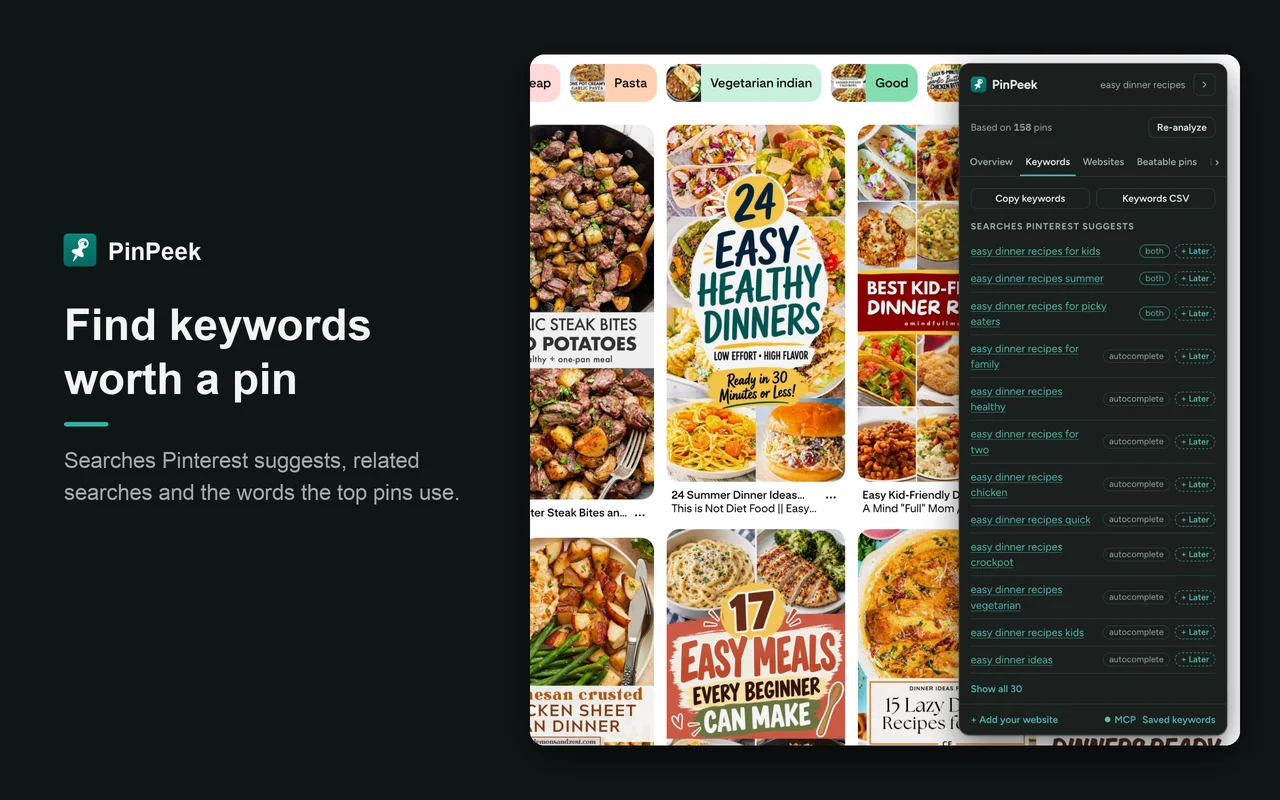
What works: the competition check nobody else gives for free, plus Pinterest's own suggestions in one list. Where it falls short: no search volume, it needs you logged in to Pinterest, and it's brand new. On "turtle tank ideas" it said tough for a new site; the full example is in how to check Pinterest keyword competition. Get it on the Chrome Web Store.
A Simple Free Workflow
- Ideas: type your topic into Pinterest's search bar and note the longer suggestions and related-search buttons.
- Demand: put the best few into Pinterest Trends. Drop anything flat at the bottom of the chart, and note seasonal peaks.
- Competition: search each survivor, scroll, and check the top pins in PinPeek. Keep the winnable and possible ones.
- Titles: use the words and phrases the winning pins already use, in your own wording.
That covers the whole job without paying for anything. When you do want volume numbers, the paid options are compared in PinClicks alternatives. And to get more out of the pins once they bring people to your site, see why most Pinterest plugins fail on mobile and A/B testing your Pin It button.
Frequently Asked Questions
Is there a free Pinterest keyword tool with search volume?
Not with real numbers. Pinterest Trends is free and shows how interest in a search changes over time on a 0 to 100 scale. Tools that show volume numbers, such as Pinterest Pin Stats Extended Pro, PinWise Pro or PinClicks, charge for them, and Keywords Everywhere says the volume it shows on Pinterest is Google's, on a paid plan.
Does Pinterest have a keyword planner?
Not a free one like Google's Keyword Planner. The closest free tools Pinterest offers are Pinterest Trends, for demand over time, and the suggestions in its own search bar, which show what people type.
How do I find low-competition Pinterest keywords?
Take the narrower searches Pinterest suggests for a broad keyword, then check each one's top 50 pins: many low-save or old pins and many different websites mean low competition. PinPeek, which I built, gives that check as a verdict and is free as of September 2026.
Tool names belong to their respective owners. Pinterest is a trademark of Pinterest, Inc. PinPeek is not affiliated with or endorsed by Pinterest.